
Research team
Clinical research support
Clinical depth, in your hands.
Detail and discipline that an experienced practitioner expects.
Research syncs continuously. Protocol changes are versioned.
| Marker | Content notes |
|---|---|
[[E01.eyebrow]] |
Plain text, one line |
[[E01.headline]] |
Plain text, sentence case |
[[E01.itemN.label]] |
Plain text |
[[E01.itemN.body]] |
Plain text |
[[E01.eyebrow]] What this is for
[[E01.headline]] Clinical depth, in your hands.
[[E01.item1.label]] Column label
[[E01.item1.body]] Column copy goes here.
[[E01.item2.label]] Column label
[[E01.item2.body]] Column copy goes here.

| Marker | Content notes |
|---|---|
[[M01.image]] |
Insert with the editor image button, or paste a URL |
[[M01.image.alt]] |
Required. Not visible — screen readers and SEO. Overrides the alt on the inserted image |
[[M01.caption]] |
Plain text |
[[M01.ratio]] |
Not visible. Reserves space so the page does not shift while loading. Default 16/9 |
[[M01.image]]
[[M01.image.alt]] Describe what the image shows
[[M01.caption]] Optional caption
[[M01.ratio]] 16/9
| Marker | Content notes |
|---|---|
[[C01.eyebrow]] |
Plain text, one line |
[[C01.headline]] |
Plain text, sentence case |
[[C01.itemN.initials]] |
Avatar circle. Two characters reads best |
[[C01.itemN.name]] |
Required for the card to render |
[[C01.itemN.role]] |
Plain text |
[[C01.itemN.cta]] |
Needs url to render |
[[C01.itemN.url]] |
Destination of the button above. mailto: or https: |
[[C01.eyebrow]] Section 04 · Clinical support
[[C01.headline]] Direct lines into the clinical and research teams.
[[C01.item1.initials]] RT
[[C01.item1.name]] Research team
[[C01.item1.role]] Clinical research support
[[C01.item1.cta]] [email protected]
[[C01.item1.url]] mailto:[email protected]
[[C01.item2.initials]] RT
[[C01.item2.name]] Research team
[[C01.item2.role]] Clinical research support
[[C01.item2.cta]] [email protected]
[[C01.item2.url]] mailto:[email protected]
Red light therapy (LLLT/photobiomodulation) for plantar fasciitis is backed by four meta-analyses — the strongest evidence base of any condition in this series. A 2023 meta-analysis (N=1,089) found LLLT not only outperforms placebo but delivers better pain relief than extracorporeal shockwave therapy (ESWT), a standard clinical treatment. Here's what the evidence shows and how to use it at home.
Yes — and the evidence is unusually strong. Research shows red light therapy is significantly more effective than placebo for plantar fasciitis pain, with improvements in both heel pain scores and functional outcomes. Four separate meta-analyses have confirmed this finding across different study populations. A 2022 meta-analysis also found LLLT significantly reduces pain and disability in lower extremity tendinopathy including plantar fasciitis in both the short and medium term (PMID 36171024).
The most comprehensive evidence comes from a 2023 meta-analysis of 1,089 patients (PMID 37464155). The finding: "Photobiomodulation therapy improves pain intensity with or without exercise and has been shown to be superior to ESWT for pain relief." This is a significant finding — ESWT is a clinic-based procedure costing $200–$500 per session, and LLLT matched or exceeded its outcomes in this population.
A separate meta-analysis (PMID 30653125) confirmed that LLLT produces statistically significant reductions in visual analogue scale (VAS) pain scores in plantar fasciitis patients, with effect sizes that were clinically meaningful rather than just statistically significant.
A 2022 meta-analysis comparing LLLT combined with stretching against stretching alone found the combination produced superior outcomes (PMID 36171024). This has practical implications: adding a 10–15 minute LLLT session before or after your morning stretching routine amplifies the results of the stretching you're already doing. The mechanisms are complementary — stretching improves plantar fascia flexibility and load distribution; LLLT reduces the underlying inflammatory burden and stimulates collagen remodelling in the fascia itself.
Another systematic review (PMID 34847470) confirmed LLLT reduces heel pain and improves functional scores, with the greatest improvements seen in patients who had been symptomatic for 6+ months.
The consistent finding across all four meta-analyses is that LLLT works through a specific mechanism: it reduces the concentration of pro-inflammatory prostaglandins and cytokines in the plantar fascia insertion point (the calcaneal enthesis), while stimulating fibroblast activity for collagen repair. The 660nm wavelength targets the superficial fascia layer; 850nm penetrates to the calcaneal attachment where chronic plantar fasciitis originates.
Plantar fasciitis lasting more than 3 months — the most common presentation in adults seeking home treatment — responds particularly well to LLLT. The chronic inflammatory state in long-standing plantar fasciitis creates a self-perpetuating cycle of pain → guarded walking → increased tension → more pain. Red light therapy interrupts this cycle by addressing the inflammatory component directly, independent of mechanical load.
Calcaneal spurs (bony projections at the heel) often co-exist with plantar fasciitis and contribute to the pain syndrome. While LLLT doesn't dissolve bone spurs, it reduces the periosteal and fascial inflammation around the spur that causes most of the pain. Many patients with confirmed spurs on X-ray report significant relief within 3–4 weeks of consistent LLLT use.
Runners who return too quickly from plantar fasciitis frequently re-injure the fascia. LLLT during the active return-to-running phase — particularly on high-mileage training days — reduces post-run inflammatory response and accelerates overnight tissue repair. This allows faster progression through the return-to-sport protocol without the setbacks that typically extend recovery timelines.
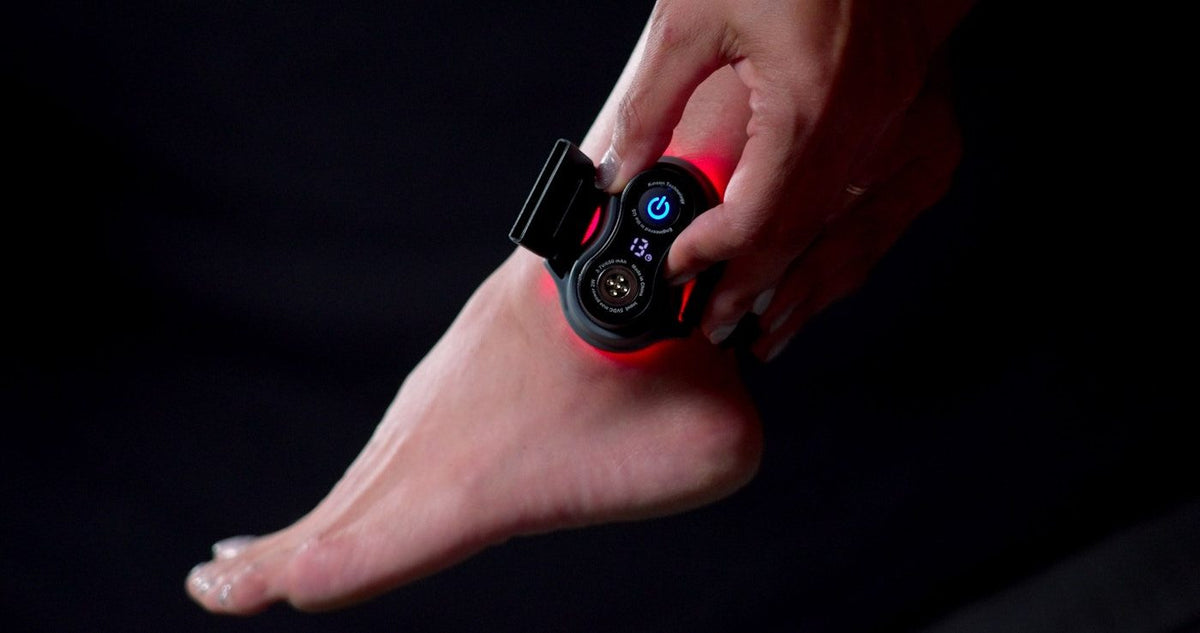
The primary treatment target is the plantar surface of the heel — specifically the medial calcaneal tubercle where the plantar fascia inserts. Place the MOVE+ 2.0 diodes flat against the bottom of the heel, directly on the area of maximum morning pain. For runners with pain extending into the arch, extend the device placement toward the midfoot on alternate sessions. Thin socks are acceptable; bare skin maximises photon delivery.
The MOVE+ 2.0 wearable red light device is FDA 510(k) cleared and delivers the 660nm + 808nm wavelength combination validated in the clinical literature above. Its flexible design wraps around the foot, enabling hands-free treatment during the morning stretching routine — the most effective time for plantar fasciitis intervention.
Related: red light therapy for back pain · how photobiomodulation works
| Marker | Content notes |
|---|---|
[[A01.toc_title]] |
Plain text. Optional — defaults to "On this page" |
[[A01.intro]] |
Plain text. One paragraph per line. **bold** and [text](url) allowed |
[[A01.takeaways_title]] |
Plain text. Optional — defaults to "Key takeaways" |
[[A01.body]] |
Plain text, the whole article, one block per line: "## " heading (becomes a side-navigation entry automatically), "### " sub-heading, "- " list item, anything else a paragraph. **bold** and [text](url) allowed. Editor formatting buttons also work |
[[A01.card_label]] |
Plain text, one line. Small caps line above the card title |
[[A01.card_title]] |
Plain text. The product card in the right column only shows if this or card_cta exists |
[[A01.card_body]] |
Plain text, one or two sentences |
[[A01.card_image]] |
Insert with the editor image button, or paste a URL. Product cut-out on transparent background reads best. Optional |
[[A01.card_image.alt]] |
Required if there is an image. Not visible — screen readers and SEO |
[[A01.card_cta]] |
Plain text. Button label. Needs card_url to render. Write [price] to show the current Shopify price of the product in card_url |
[[A01.card_url]] |
Destination of the button above. Not visible. https:// or /products/… |
[[A01.cta_eyebrow]] |
Plain text, one line. Inline sales box — place it in body with a line that says only [cta], as many times as needed |
[[A01.cta_title]] |
Plain text. The box only renders if this exists |
[[A01.cta_label]] |
Plain text. Button label. Needs cta_url to render. Write [price] to show the current Shopify price of the product in cta_url |
[[A01.cta_url]] |
Destination of the button above. Not visible. https:// or /products/… |
[[A01.cta_note]] |
Plain text, one line under the button |
[[A01.faq_title]] |
Plain text. Optional — defaults to "Frequently Asked Questions". Also adds an entry to the side navigation |
[[A01.author_title]] |
Plain text. Optional — defaults to "About the Author" |
[[A01.author_bio]] |
Plain text, one paragraph per line. **bold** and [text](url) allowed. Optional on blog posts — defaults to the post's author_description metafield. The author box only shows if there is a bio. Name and role come from the hero: A02.author / A02.author_role, or the post author and its author_jobTitle metafield. The avatar uses the Author Image metafield when set |
[[A01.author_url]] |
Link under the bio. Not visible. A LinkedIn URL shows the LinkedIn icon |
[[A01.author_link_label]] |
Plain text. Optional — defaults to "View LinkedIn Profile →" for LinkedIn URLs, "View profile →" otherwise |
[[A01.takeawayN]] |
Plain text, one line. **bold** and [text](url) allowed. The box only shows if at least one exists |
[[A01.faqN.q]] |
Plain text. The question. The FAQ block only shows if at least one exists |
[[A01.faqN.a]] |
Plain text, one paragraph per line. **bold** and [text](url) allowed. Needs its question to render |
[[A01.toc_title]] On this page
[[A01.intro]] Red light therapy for plantar fasciitis is backed by four meta-analyses.
[[A01.takeaways_title]] Key takeaways
[[A01.body]] ## First section of the article
[[A01.card_label]] Recommended device
[[A01.card_title]] MOVE+ for ankles
[[A01.card_body]] Wrap it on, press start, get back to your day.
[[A01.card_image]]
[[A01.card_image.alt]] MOVE+ wearable device
[[A01.card_cta]] Shop MOVE+ — [price]
[[A01.card_url]] /products/red-light-therapy-device
[[A01.cta_eyebrow]] FDA 510(k) Cleared · 660nm + 808nm
[[A01.cta_title]] Try MOVE+ 2.0 Risk-Free for 30 Days
[[A01.cta_label]] Shop MOVE+ 2.0 — [price]
[[A01.cta_url]] /products/red-light-therapy-device
[[A01.cta_note]] 30-day money-back guarantee
[[A01.faq_title]] Frequently Asked Questions
[[A01.author_title]] About the Author
[[A01.author_bio]] Chris Bohler is the Chief Technology Officer at Kineon.
[[A01.author_url]] https://www.linkedin.com/in/…
[[A01.author_link_label]] View LinkedIn Profile →
[[A01.takeaway1]] Yes — and the evidence is unusually strong.
[[A01.faq1.q]] How long does red light therapy take to work?
[[A01.faq1.a]] Most users notice reduced morning pain within 2–3 weeks.
[[A01.takeaway2]] Yes — and the evidence is unusually strong.
[[A01.faq2.q]] How long does red light therapy take to work?
[[A01.faq2.a]] Most users notice reduced morning pain within 2–3 weeks.
On a blog post the standfirst comes from the excerpt. On a page, write it here.

| Marker | Content notes |
|---|---|
[[A02.title]] |
Plain text. Line breaks are kept (Enter or Shift+Enter) — on every screen size, so check mobile. Overrides only the visible H1; SEO title and blog listing keep the post title. Optional on blog posts — defaults to the post title. Required on pages |
[[A02.standfirst]] |
Plain text. Line breaks are kept (Enter or Shift+Enter) — on every screen size, so check mobile. Optional on blog posts — defaults to the post excerpt, whose line breaks are kept too |
[[A02.tags]] |
Comma-separated. Optional on blog posts — defaults to the post tags, hiding those that start with _. Shown in alphabetical order (Shopify sorts post tags) |
[[A02.author]] |
Plain text. Optional on blog posts — defaults to the post author. The avatar shows its initials |
[[A02.author_role]] |
Plain text. Optional on blog posts — defaults to the post's author_jobTitle metafield. The avatar uses the Author Image metafield when set, initials otherwise |
[[A02.date]] |
Plain text. Optional on blog posts — defaults to the publish date |
[[A02.read_time]] |
Plain text. Optional — calculated from the word count at 200 words per minute |
[[A02.image]] |
Optional on blog posts — defaults to the featured image. Insert with the editor image button, or paste a URL. Cropped to 21:9 |
[[A02.image.alt]] |
Required if image is set here. Not visible — screen readers and SEO. On blog posts the featured image alt is used |
[[A02.title]] Red Light Therapy for Plantar Fasciitis: Clinical Evidence and How to Use It
[[A02.standfirst]] A deeper evidence review of PBM for plantar fasciitis.
[[A02.tags]] Treatment protocols, Ankle, Tendonitis
[[A02.author]] Chris Bohler
[[A02.author_role]] Chief Technology Officer, Kineon
[[A02.date]] Nov 2025
[[A02.read_time]] 9 minutes
[[A02.image]]
[[A02.image.alt]] Describe what the image shows

Answer a few questions about your pain and goals. We'll match you to the right MOVE+ protocol.
Take the 2-minute quiz| Marker | Content notes |
|---|---|
[[A03.label]] |
Plain text, one line. Optional — defaults to "Not sure where to start?" |
[[A03.title]] |
Plain text. Line breaks are kept. Optional — defaults to "Find the right protocol for your pain" |
[[A03.body]] |
Plain text. Optional — defaults to the quiz invitation copy |
[[A03.cta_label]] |
Plain text. Optional — defaults to "Take the 2-minute quiz" |
[[A03.cta_url]] |
Destination of the button. Not visible. Optional — defaults to /pages/kineon-pain-quiz |
[[A03.image]] |
Background photo of the whole banner (no label shown on it in the catalogue). Insert with the editor image button, or paste a URL. Optional — defaults to the original blog photo. The left side sits under a dark gradient behind the text |
[[A03.image.alt]] |
Not visible — screen readers and SEO. Only used with image |
[[A03.label]] Not sure where to start?
[[A03.title]] Find the right protocol for your pain
[[A03.body]] Answer a few questions about your pain and goals.
[[A03.cta_label]] Take the 2-minute quiz
[[A03.cta_url]] /pages/kineon-pain-quiz
[[A03.image]]
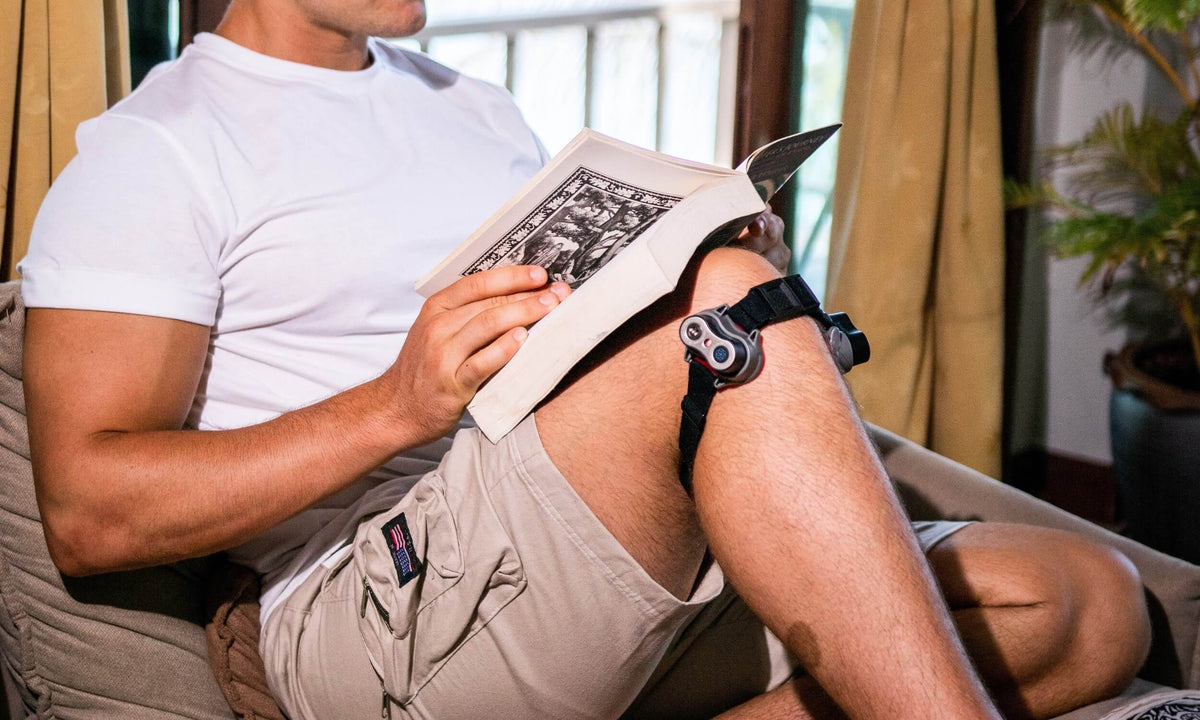
[[A03.image.alt]] Knee wearing the MOVE+ device
| Marker | Content notes |
|---|---|
[[A04.title]] |
Plain text. Optional — defaults to "Related reading" |
[[A04.link_label]] |
Plain text. Optional — defaults to "View all articles". Links to the blog |
[[A04.articleN]] |
Handle of a blog post (the end of its URL), or blog-handle/post-handle for another blog. Up to 3. Only used if the post has no "Related articles" metafield; without either, related posts are picked automatically by shared tag |
[[A04.title]] Related reading
[[A04.link_label]] View all articles
[[A04.article1]] red-light-therapy-for-knee-pain
[[A04.article2]] red-light-therapy-for-knee-pain
| Marker | Content notes |
|---|---|
[[L00.product]] |
Handle of the product this lander sells (the end of its URL). Required: the offer block, the sticky bar, the {price}/{compare_at}/{save} tokens and every button without a URL use it |
[[L00.sticky_title]] |
Plain text. Tokens {price}, {compare_at} and {save} are replaced with the product prices. Optional — defaults to the product title + " — Save {save}" |
[[L00.sticky_note]] |
Plain text, one short line under the title. Optional |
[[L00.sticky_cta]] |
Plain text. Button label. Optional — defaults to "Shop now →" |
[[L00.sticky]] |
Write off to hide the sticky bar. Optional |
[[L00.tracking]] |
Name of this lander in the GA4 event lander_cta_click. Optional — defaults to the page handle |
[[L00.product]] red-light-therapy-device
[[L00.sticky_title]] MOVE+ — Save {save}
[[L00.sticky_note]] 30-day risk-free
[[L00.sticky_cta]] Get relief →
[[L00.sticky]] on
[[L00.tracking]] persistent-pain
Full-bleed photo with a dark gradient, the text bottom-left.
| Marker | Content notes |
|---|---|
[[L01.eyebrow]] |
Plain text, one line. Shown in capitals |
[[L01.title]] |
Plain text. Line breaks are kept |
[[L01.text]] |
Plain text, one or two sentences |
[[L01.cta_label]] |
Plain text. Main (white) button. Optional |
[[L01.cta_url]] |
Not visible. Optional — defaults to the product in L00.product |
[[L01.cta2_label]] |
Plain text. Secondary (outlined) button. Optional |
[[L01.cta2_url]] |
Not visible. Use #anchor to jump to a band with that anchor |
[[L01.image]] |
Background photo, full width. Insert or paste a URL. The left side sits under a dark gradient behind the text |
[[L01.image.alt]] |
Not visible — screen readers and SEO |
[[L01.trustN]] |
Plain text, short. Items of the trust row, joined with · |
[[L01.eyebrow]] For people whose pain has outlasted the injury
[[L01.title]] It isn’t one joint any more.
[[L01.text]] One strap you move to whatever is sore.
[[L01.cta_label]] Get relief from persistent pain →
[[L01.cta_url]] /products/red-light-therapy-device
[[L01.cta2_label]] See how it works
[[L01.cta2_url]] #how
[[L01.image]]
[[L01.image.alt]] The MOVE+ strapped around a joint
[[L01.trust1]] 30-day money-back guarantee
[[L01.trust2]] 30-day money-back guarantee
It sets the background.
The components written after it (L03 to L11, L14) share its background, until the next L02. Text allows bold, italic and links.
| Marker | Content notes |
|---|---|
[[L02.tone]] |
Background of the whole band: warm (default), white or dark. Every component below this header uses it, until the next L02 |
[[L02.anchor]] |
Not visible. Lowercase, no spaces. Lets a button jump here with #anchor. Optional |
[[L02.eyebrow]] |
Plain text, one line. Shown in capitals |
[[L02.title]] |
Plain text. Line breaks are kept |
[[L02.subtitle]] |
Plain text, one short sentence. Large text at the top of the right column. Optional |
[[L02.text]] |
Plain text, one paragraph per line. **bold**, *italic* and [text](url) allowed |
[[L02.tone]] warm
[[L02.anchor]] how
[[L02.eyebrow]] Sound familiar?
[[L02.title]] The injury healed. The pain didn’t.
[[L02.subtitle]] And now it moves around.
[[L02.text]] You can still name the original thing.

L03 · Image or video with a caption.
| Marker | Content notes |
|---|---|
[[L03.image]] |
Insert with the editor image button, or paste a URL. Upload to Content → Files first. With a video, it is the fallback for browsers that cannot play it |
[[L03.image.alt]] |
Not visible — screen readers and SEO |
[[L03.video]] |
Not visible. URL of an .mp4 in Content → Files. Plays muted, in a loop. Optional |
[[L03.poster]] |
Not visible. Image URL shown while the video loads. Optional |
[[L03.caption]] |
Plain text, small, under the media. **bold**, *italic* and [text](url) allowed. Optional |
[[L03.image]]
[[L03.image.alt]] A woman pausing on a staircase
[[L03.video]] https://cdn.shopify.com/…/device-loop.mp4
[[L03.poster]] https://cdn.shopify.com/…/device-loop-poster.webp
[[L03.caption]] Illustration, not a clinical image.
| Marker | Content notes |
|---|---|
[[L04.rowN.label]] |
Plain text, short. Shown in capitals. To number the rows, write the number: 01 Strap it on |
[[L04.rowN.text]] |
Plain text, one or two sentences. **bold**, *italic* and [text](url) allowed. A row needs its label or its text |
[[L04.row1.label]] Heat pads
[[L04.row1.text]] Surface warmth, roughly half a centimetre of penetration.
[[L04.row2.label]] Heat pads
[[L04.row2.text]] Surface warmth, roughly half a centimetre of penetration.
| Marker | Content notes |
|---|---|
[[L02.tone]] |
Background of the whole band: warm (default), white or dark. Every component below this header uses it, until the next L02 |
[[L02.anchor]] |
Not visible. Lowercase, no spaces. Lets a button jump here with #anchor. Optional |
[[L02.eyebrow]] |
Plain text, one line. Shown in capitals |
[[L02.title]] |
Plain text. Line breaks are kept |
[[L02.subtitle]] |
Plain text, one short sentence. Large text at the top of the right column. Optional |
[[L02.text]] |
Plain text, one paragraph per line. **bold**, *italic* and [text](url) allowed |
[[L02.tone]] warm
[[L02.anchor]] how
[[L02.eyebrow]] Sound familiar?
[[L02.title]] The injury healed. The pain didn’t.
[[L02.subtitle]] And now it moves around.
[[L02.text]] You can still name the original thing.
Kicker, title, text and a note at the foot.
On a white band cards turn beige.
| Marker | Content notes |
|---|---|
[[L05.cardN.kicker]] |
Plain text, short. Small capitals above the title. Optional |
[[L05.cardN.title]] |
Plain text. The card only shows if it has a title |
[[L05.cardN.text]] |
Plain text, two or three sentences. **bold**, *italic* and [text](url) allowed |
[[L05.cardN.note]] |
Plain text, one line at the foot of the card, under a rule. Optional |
[[L05.card1.kicker]] Pattern 01
[[L05.card1.title]] Mornings are the worst part
[[L05.card1.text]] Thirty to sixty minutes of stiffness before you feel like yourself.
[[L05.card1.note]] 10 minutes while the kettle boils
[[L05.card2.kicker]] Pattern 01
[[L05.card2.title]] Mornings are the worst part
[[L05.card2.text]] Thirty to sixty minutes of stiffness before you feel like yourself.
[[L05.card2.note]] 10 minutes while the kettle boils
| Marker | Content notes |
|---|---|
[[L06.statN.value]] |
Plain text, short — it never wraps. A stat only shows if it has a value |
[[L06.statN.label]] |
Plain text, short. Small capitals under the value |
[[L06.stat1.value]] 808nm
[[L06.stat1.label]] Infrared laser diodes
[[L06.stat2.value]] 808nm
[[L06.stat2.label]] Infrared laser diodes
“Real, verified reviews only, as the customer wrote them.”
Reviews describe individual experiences and are not typical or guaranteed results.
| Marker | Content notes |
|---|---|
[[L07.note]] |
Plain text, small, under the reviews. Use it for the results disclaimer. Optional |
[[L07.reviewN.quote]] |
Plain text: the customer's words as written, with quotes. The review only shows if it has a quote. Use real, verified reviews only |
[[L07.reviewN.author]] |
Plain text. Small capitals under the quote |
[[L07.reviewN.stars]] |
Number from 1 to 5. Optional — defaults to 5 |
[[L07.note]] Reviews describe individual experiences and are not typical or guaranteed results.
[[L07.review1.quote]] “It’s worked wonders for my knees.”
[[L07.review1.author]] John C. · Verified buyer
[[L07.review1.stars]] 5
[[L07.review2.quote]] “It’s worked wonders for my knees.”
[[L07.review2.author]] John C. · Verified buyer
[[L07.review2.stars]] 5
| Marker | Content notes |
|---|---|
[[L02.tone]] |
Background of the whole band: warm (default), white or dark. Every component below this header uses it, until the next L02 |
[[L02.anchor]] |
Not visible. Lowercase, no spaces. Lets a button jump here with #anchor. Optional |
[[L02.eyebrow]] |
Plain text, one line. Shown in capitals |
[[L02.title]] |
Plain text. Line breaks are kept |
[[L02.subtitle]] |
Plain text, one short sentence. Large text at the top of the right column. Optional |
[[L02.text]] |
Plain text, one paragraph per line. **bold**, *italic* and [text](url) allowed |
[[L02.tone]] warm
[[L02.anchor]] how
[[L02.eyebrow]] Sound familiar?
[[L02.title]] The injury healed. The pain didn’t.
[[L02.subtitle]] And now it moves around.
[[L02.text]] You can still name the original thing.
| MOVE+ | Panel | Heat pad | |
|---|---|---|---|
| Light source | 808nm laser + 660nm LED | LED only | None |
| Penetration | 2–3cm | Under 1cm | Surface |
| Marker | Content notes |
|---|---|
[[L08.table]] |
One row per line, cells separated by a vertical bar. First line = column headers, starting with a bar because the top-left corner is empty. First cell of every row = the row label |
[[L08.highlight]] |
Number of the value column to highlight in black, counting from 1. Optional — defaults to 1; 0 highlights none |
[[L08.caption]] |
Not visible. One sentence describing the table, for screen readers |
[[L08.hint]] |
Plain text, shown under the table on mobile only, where it scrolls sideways. Optional — defaults to “Swipe the table to compare →” |
[[L08.table]] Light source / 808nm laser + 660nm LED / LED only / None (separated by vertical bars)
[[L08.highlight]] 1
[[L08.caption]] Comparison of MOVE+, red light panels and TENS devices
[[L08.hint]] Swipe the table to compare →

| Marker | Content notes |
|---|---|
[[L14.image]] |
Insert or paste a URL. Leave room on both sides: labels take 17% of each side |
[[L14.image.alt]] |
Not visible — screen readers and SEO |
[[L14.pointN.label]] |
Plain text, short. The point only shows if it has a label |
[[L14.pointN.at]] |
Not visible. Position as X Y SIDE HEIGHT: X and Y = where the numbered dot goes, in % of the image width and height; SIDE = left or right margin for the label; HEIGHT = label height in % (optional, defaults to Y) |
[[L14.image]]
[[L14.image.alt]] The MOVE+ assembly with its parts
[[L14.point1.label]] 808nm laser + 660nm LED
[[L14.point1.at]] 28.2 31.9 left 26
[[L14.point2.label]] 808nm laser + 660nm LED
[[L14.point2.at]] 28.2 31.9 left 26
| Marker | Content notes |
|---|---|
[[L11.label]] |
Plain text. Button label. The button only shows if it has a label |
[[L11.url]] |
Not visible. Optional — defaults to the product in L00.product |
[[L11.label]] Get relief from persistent pain →
[[L11.url]] /products/red-light-therapy-device
| Marker | Content notes |
|---|---|
[[L02.tone]] |
Background of the whole band: warm (default), white or dark. Every component below this header uses it, until the next L02 |
[[L02.anchor]] |
Not visible. Lowercase, no spaces. Lets a button jump here with #anchor. Optional |
[[L02.eyebrow]] |
Plain text, one line. Shown in capitals |
[[L02.title]] |
Plain text. Line breaks are kept |
[[L02.subtitle]] |
Plain text, one short sentence. Large text at the top of the right column. Optional |
[[L02.text]] |
Plain text, one paragraph per line. **bold**, *italic* and [text](url) allowed |
[[L02.tone]] warm
[[L02.anchor]] how
[[L02.eyebrow]] Sound familiar?
[[L02.title]] The injury healed. The pain didn’t.
[[L02.subtitle]] And now it moves around.
[[L02.text]] You can still name the original thing.
Prices come from the product in L00.product.
| Marker | Content notes |
|---|---|
[[L09.save_label]] |
Plain text. The black badge under the price. Tokens {price}, {compare_at}, {save}. Only shown when the product has a compare-at price. Optional — defaults to “You save {save} today” |
[[L09.finance]] |
Plain text under the price. Tokens {price}, {compare_at}, {save}; **bold** and [text](url) allowed. Optional |
[[L09.cta_label]] |
Plain text. Button label |
[[L09.cta_url]] |
Not visible. Optional — defaults to the product in L00.product |
[[L09.box_title]] |
Plain text. Title over the what’s-in-the-box grid. Optional — defaults to “What’s in the box” |
[[L09.guarantee_label]] |
Plain text, short. Label of the guarantee row. Optional |
[[L09.guarantee_text]] |
Plain text. The guarantee, one or two sentences |
[[L09.trustN]] |
Plain text, short. Small capitals under the button, three across |
[[L09.boxN.qty]] |
Plain text. Quantity, e.g. 3× or 1× |
[[L09.boxN.name]] |
Plain text. The item only shows if it has a name |
[[L09.save_label]] You save {save} today
[[L09.finance]] Pay in installments with Shop Pay. HSA/FSA eligible.
[[L09.cta_label]] Get relief from persistent pain →
[[L09.cta_url]] /products/red-light-therapy-device
[[L09.box_title]] What’s in the box
[[L09.guarantee_label]] 30-day trial
[[L09.guarantee_text]] Use it for 30 days. If you don’t feel a difference, contact us for a full refund.
[[L09.trust1]] Free shipping
[[L09.box1.qty]] 3×
[[L09.box1.name]] Laser + LED modules
[[L09.trust2]] Free shipping
[[L09.box2.qty]] 3×
[[L09.box2.name]] Laser + LED modules
Each question opens on its own. The FAQ is also sent to Google as structured data.
| Marker | Content notes |
|---|---|
[[L10.faqN.q]] |
Plain text. The question. The item only shows if it has a question |
[[L10.faqN.a]] |
Plain text, one paragraph per line. **bold**, *italic* and [text](url) allowed |
[[L10.faq1.q]] How quickly would I notice anything?
[[L10.faq1.a]] It varies a lot, and anyone who gives you a firm number is guessing.
[[L10.faq2.q]] How quickly would I notice anything?
[[L10.faq2.a]] It varies a lot, and anyone who gives you a firm number is guessing.

Complete on its own: no L02 needed.
| Marker | Content notes |
|---|---|
[[L12.tone]] |
Background: dark (default), warm or white |
[[L12.image]] |
Insert or paste a URL. Full width above the text. Optional |
[[L12.image.alt]] |
Not visible — screen readers and SEO |
[[L12.title]] |
Plain text. Line breaks are kept |
[[L12.text]] |
Plain text, one paragraph per line. **bold** and [text](url) allowed |
[[L12.cta_label]] |
Plain text. Button label |
[[L12.cta_url]] |
Not visible. Optional — defaults to the product in L00.product |
[[L12.rating]] |
Plain text next to five gold stars. Optional |
[[L12.tone]] dark
[[L12.image]]
[[L12.image.alt]] A couple walking along a coastal path
[[L12.title]] Ten minutes a day, or another year of working around it.
[[L12.text]] 35,000+ people have tried MOVE+ on their own joints.
[[L12.cta_label]] Get relief from persistent pain →
[[L12.cta_url]] /products/red-light-therapy-device
[[L12.rating]] 4.7 from 1,465 verified reviews
L13 · Legal disclaimer, one paragraph per line.
© Kineon. All rights reserved.
| Marker | Content notes |
|---|---|
[[L13.text]] |
Plain text, one paragraph per line. **bold** and [text](url) allowed. Use it for the FDA and results disclaimers |
[[L13.text]] These statements have not been evaluated by the Food and Drug Administration.